Lenz Fact-Checking for Google Docs.
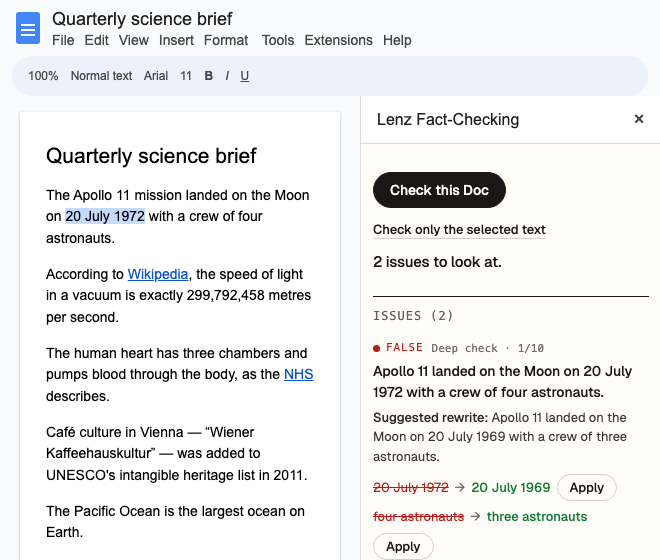
Check your draft without leaving the Doc. Lenz checks its factual claims against independent sources, and whether each cited page says what you attribute to it. The findings appear beside your text.
- Works inGoogle Docs on a computer
- AccessOnly the Docs you allow
- Your textOnly the edits you apply
- A full checkTwo to four minutes
01How it works
From the Extensions menu.
Once the add-on is installed, it is in every Doc you open.
Open the add-on
In a Google Doc, choose Extensions → Lenz Fact-Checking → Check this Doc. The first time, Google asks you to allow the add-on; once you have, choose the menu item again.
Sign in
Sign in with your Lenz account. No account yet? You can create one there.
Allow this Doc
Google’s file picker opens the first time you check a Doc. Select the Doc to let Lenz read it. The check starts as soon as you do.
Read the findings
Issues come first, then what checked out; each group follows the order of your text. Click one to select its words in the Doc.
To check one part of a long Doc, select it and choose Check only the selected text.
02What you get back
Findings beside your text.
- ClaimsA quick check of the factual claims Lenz finds: a verdict and how confident Lenz is. Issues come first, then what checked out, each group in the order of your text.
- CitationsFor each link, whether the cited page says what your draft attributes to it. A page that only partly supports it is marked Needs a closer look.
- Deep checksFor the claims that need it, Lenz investigates the claim: it researches independent sources, has two models argue both sides, and has three reviewers score the evidence. Open it in Lenz to see the sources.
- CorrectionsThe old and new wording side by side. Apply makes that one change, and Undo puts the old words back. Nothing in your Doc changes unless you click.
The deep check can change the quick verdict. When it does, rely on the deep check: it is the one that shows its sources and its reasoning.
03Without the add-on
Or bring the Doc to Lenz.
- Paste its linkShare the Doc as Anyone with the link can view, and paste its link on lenz.io or in the Workbench. When Lenz finds something to flag or correct, download the Doc as a Word document (.docx), with Lenz’s findings as comments and its suggested corrections as tracked changes. Works on any device.
- Upload the Word fileIn Google Docs, choose File → Download → Microsoft Word (.docx), and upload the file in the Workbench on a computer. When Lenz finds something to flag or correct, you get the same document back, formatting kept, with its comments and tracked changes. Open it in Word, or import it into Google Docs, which keeps both.
04Your Doc and your data
Only the Docs you allow.
- The add-on can read only the Docs you allow, one at a time. It cannot open your other Docs or any other file in your Google Drive.
- It reads the tab you have open when you start a check and sends that text to Lenz, where the check is private to your account. While the sidebar is open it reads that tab again, to find the words each finding refers to.
- It changes your Doc only when you apply a suggested correction, or undo one.
- We do not sell what we receive from Google, use it for advertising, or use it to train AI models.
- To take back its access, remove Lenz Fact-Checking under Third-party apps & services in your Google Account, and disconnect it under Connected apps in your Lenz account.
Lenz Fact-Checking’s use and transfer of information received from Google APIs will adhere to the Google API Services User Data Policy, including the Limited Use requirements.
05Cost
What it costs.
Free to start, no card required: 100 credits a month. Quick checks, citation checks and deep checks use credits from your Lenz account, as they do on the website.
06Questions
Yes. You sign in from the sidebar the first time you check a Doc, and if you do not have an account yet, you can create one there. It is free to start, and no card is required.
No. It can read only the Docs you allow, one at a time, through Google’s file picker. It cannot open your other Docs or any other file in your Google Drive.
Only when you click Apply on a suggested correction, and Undo puts the old words back. It makes no other change.
The tab you have open. To check part of it, select the paragraphs you want and choose Check only the selected text.
Yes. Paste the link to a Doc shared as Anyone with the link can view on lenz.io, or upload its Word export in the Workbench on a computer. Either way, when Lenz finds something to flag or correct, you can download a .docx with its findings as comments and its suggested corrections as tracked changes.
07Other ways to connect
The same verdicts, wherever you work.
- Claude and ChatGPTAdd Lenz to the assistant you already use. One sign-in, no key to paste.
- MCP serverClaude Code, Cursor, VS Code, Codex and other coding tools: one command, then sign in.
- n8nA community node with fourteen operations, from a quick check to a full verification.
- ZapierThe same trigger-and-actions shape for Zaps, with the same structured output.
- API & SDKsThe CLI and the REST API, with typed Python and TypeScript SDKs.